Running account (RA) bill software for contractors
For specialty contractors who are paid against measured quantity: record the measurement, build the bill from it, and keep the position of every revision.
What is an RA bill?
A running account (RA) bill claims payment for the work measured so far on a contract, instead of once at the end. Each bill is set against the one before it: what was billed earlier, what is claimed now, and the cumulative total. Deductions such as retention and TDS, and GST, are applied as the contract provides.
The problem an RA bill has to solve
An RA bill is only as good as the measurement behind it. When quantities live in a notebook or a photo on someone’s phone, the bill goes out short or late, and when the client questions a line there is no dated record to answer with. Each bill’s cumulative position then has to be rebuilt by hand from the one before.
What Buildem One does
- Site measurements are recorded in the same system the bill is built from, so executed work is not left unbilled because a sheet is in somebody’s bag.
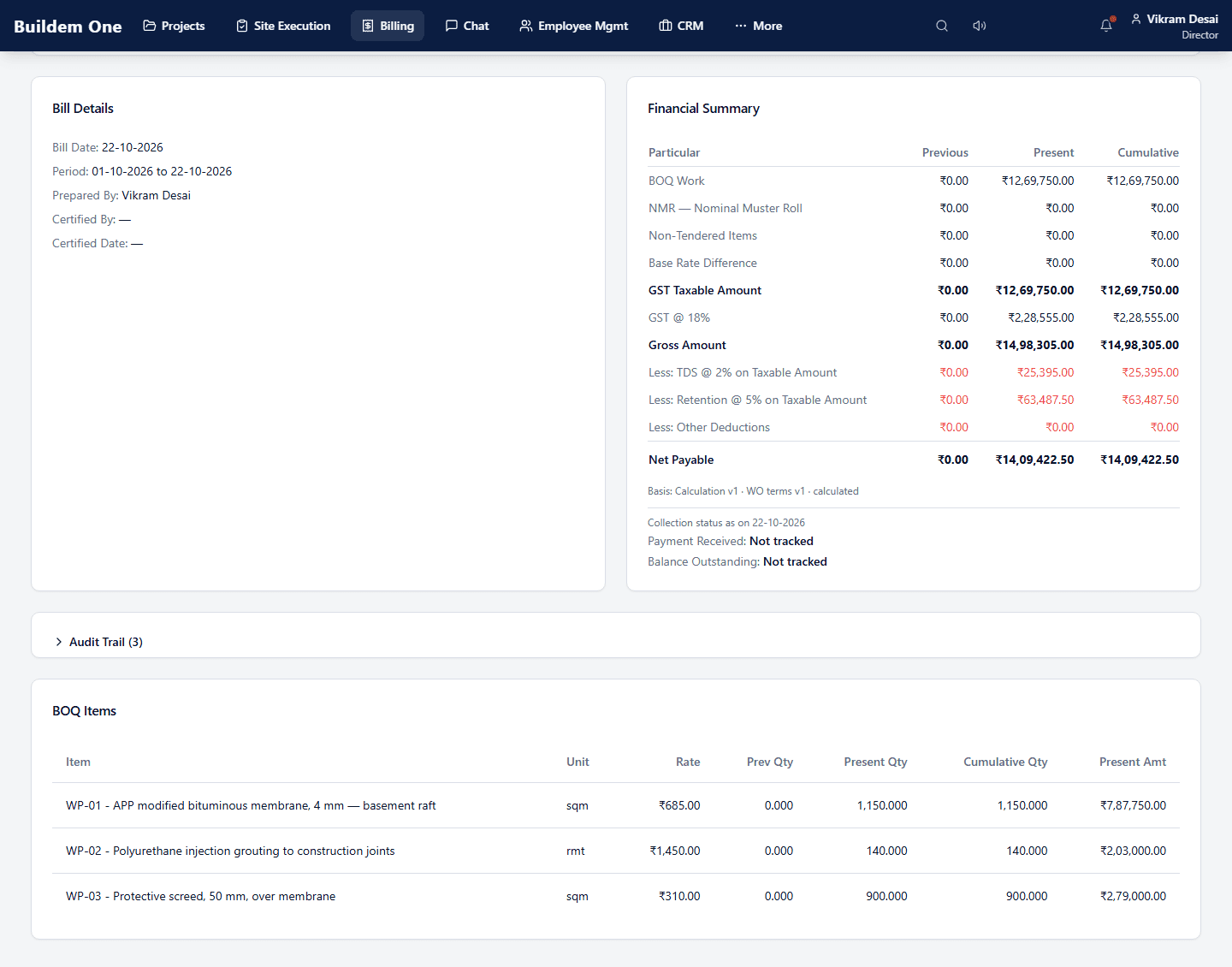
- The bill shows each line as previous, present and cumulative quantity and amount.
- Running account bills carry revisions with a cumulative position.
- The financial summary shows GST, TDS and retention worked out on the taxable amount, and the net payable.
- A payment statement shows what was billed, certified, received and retained, on one page.
How an RA bill is prepared in Buildem One
- Record the work order with its BOQ items and the agreed rates.
- Measure on site against those items and record the measurement.
- The RA bill is built from the measured quantities, as previous, present and cumulative.
- Review the financial summary: GST, TDS, retention and the net payable.
- Revise if the client certifies a different quantity; the cumulative position carries through.
- Track what was billed, certified, received and retained on the payment statement.
What it looks like
The financial summary of an RA bill, from the demo tenant:
What it does not do
RA bills, work orders, BOQ and measurement are part of the Professional plan. Buildem One is not accounting software: it gives you receivables ageing and TDS visibility, not your books, and it does not file GST returns or replace your accountant. This page claims only what the screen above shows.
See also: every capability by operating area · waterproofing contractor software · why executed work goes unbilled.
See an RA bill against your own BOQ
Choose the Professional plan and create your company account online, or request a demo on your own trade first.
Optional: for help choosing a plan, a custom arrangement or migration, write to sales@buildem.in. We reply in writing before suggesting a call.