The operating chain
Buildem One is organised around the chain that actually pays a specialty contractor, not around a general contractor's programme.
Most software for construction starts from the main contractor’s point of view: a programme, packages, and subcontractors to manage. If you are the specialist doing the waterproofing or the painting, you are one of those packages. Your unit of work is a BOQ item, and your unit of money is an RA bill against measured quantity.
That is the shape Buildem One is built around.
Where the money actually leaks
It is rarely the work. It is the record of the work: a measurement that stayed in a notebook, a muster nobody can reconcile, material that reached a site with no project attached to it. Each of those becomes a conversation with a client you cannot win, because you have nothing dated to point at.
One project id, end to end
Attendance, labour cost, material issue, measurement, bill and receivable all hang off the same project. That is what makes a disputed line answerable six months later.
Work orders, BOQ, measurement and RA billing are included from Professional. Every line below carries the plan that includes it, and the plans page states exactly what each tier covers.
Looking for something specific? See RA bill software for contractors or waterproofing contractor software.
Screens from Buildem One
Three screens from Buildem One, shown close up with fictional sample data. The text beside each one says what to look for.
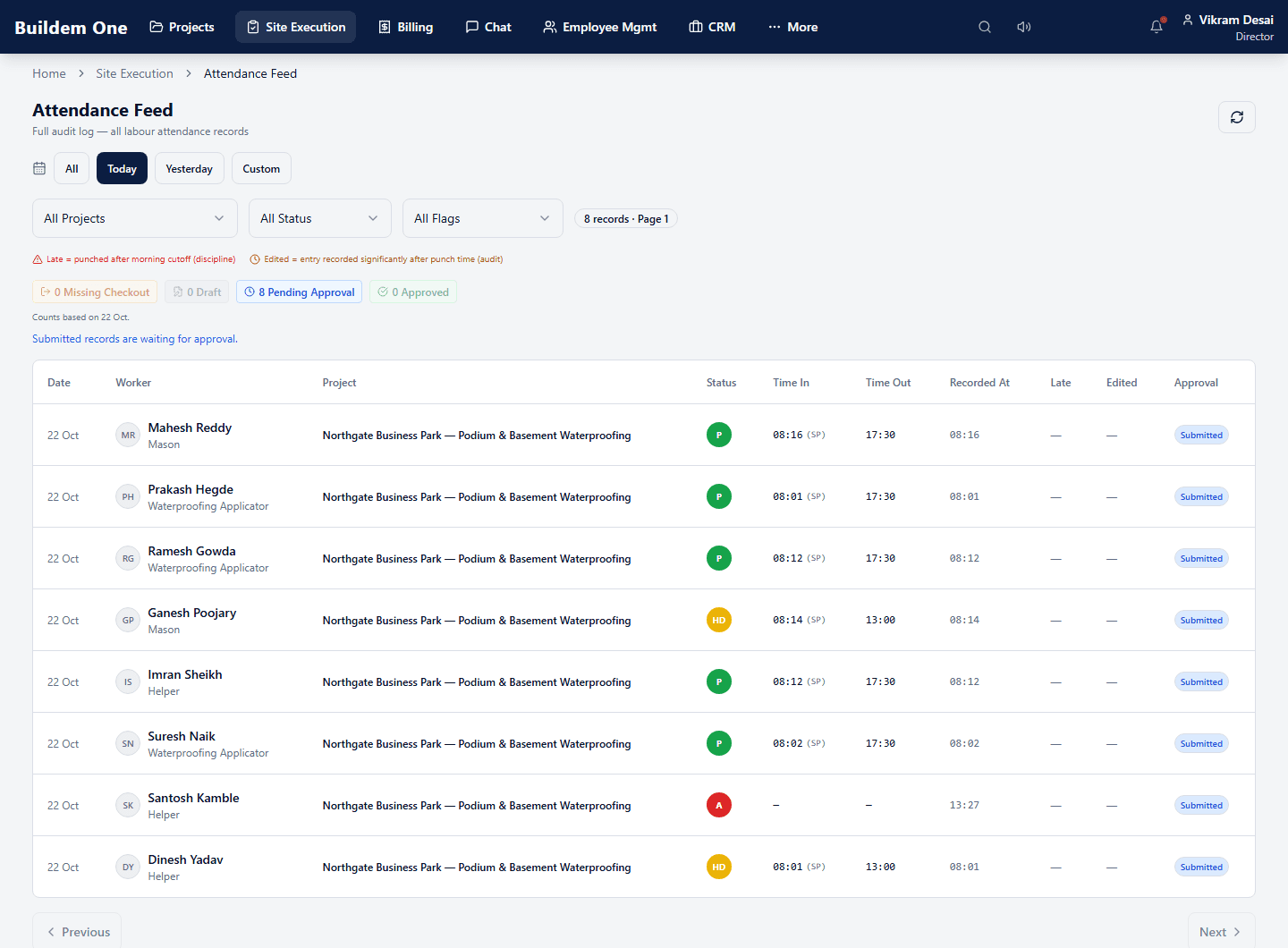
Know who is on site today
Mark the daily muster from site. Each worker’s status, times and approval state sit in one feed, so wages are argued from a record. Included in every plan.
- Each worker’s status for the day: P present, HD half day, A absent
- Time in and time out, against the project the worker was on
- A count of records still waiting for approval
See the day’s work against plan
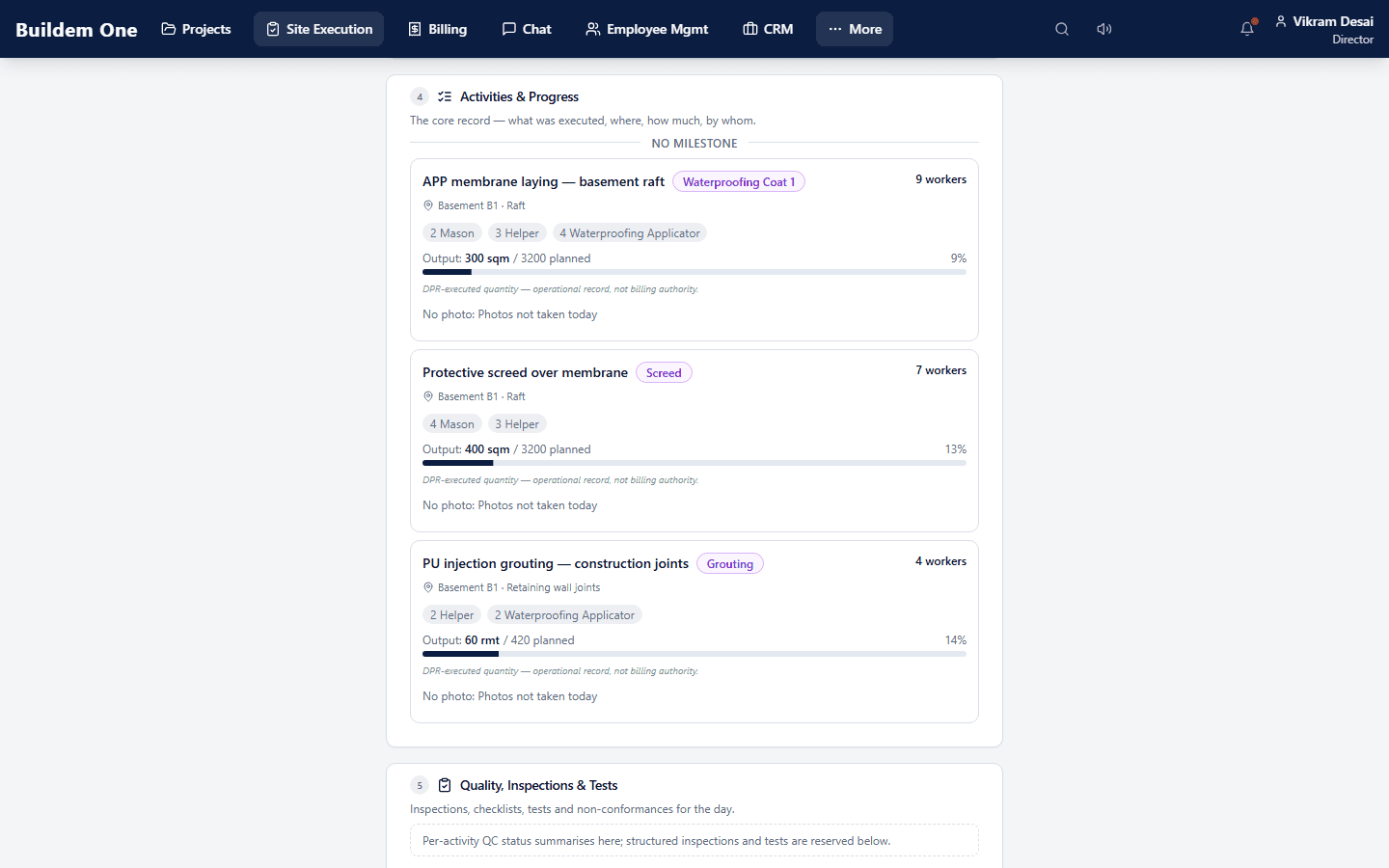
The daily progress report records what was executed, where, by which workers and how much against plan, with photos for each activity or a recorded reason when there are none. Included in every plan.
- The workers on each activity, by trade
- Quantity executed against the planned quantity, with a progress bar
- A note on whether photos were taken
- The executed quantity is labelled an operational record; billing follows measurement
Bill from what was measured
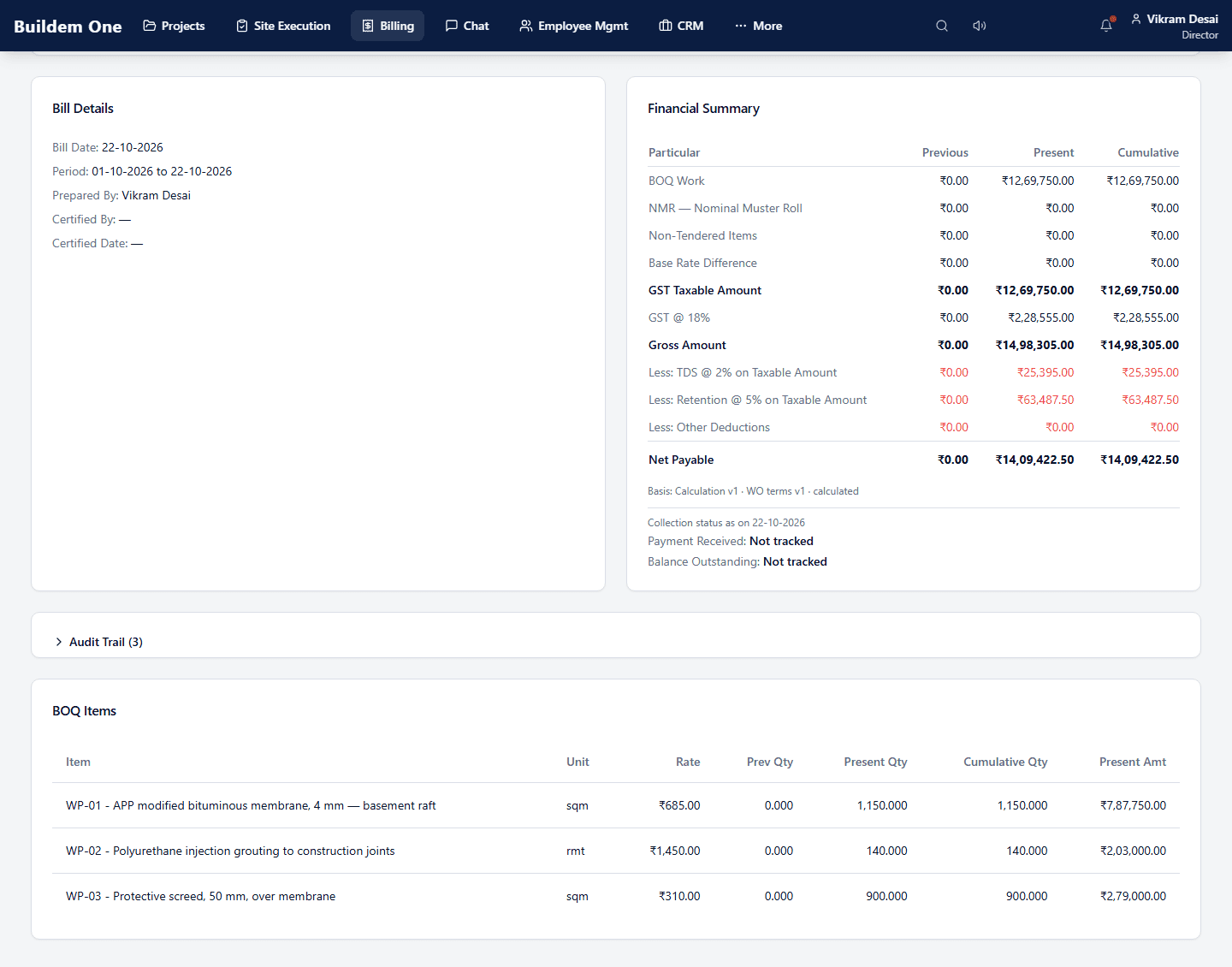
A running account bill works out GST, TDS and retention and shows the net payable, as previous, present and cumulative. RA bills are part of the Professional plan.
- Previous, present and cumulative amounts for every line
- GST on the taxable amount, then TDS and retention deducted
- Net payable at the foot of the summary
What is in the product today
49 capabilities, grouped by the part of the business they belong to. Several are set up for your company during onboarding.
The tag on each line is the cheapest plan that includes it.
Enquiries and clients
2Where the work comes from, followed through to a project instead of living in somebody's phone.
- Clients, their contacts and their sites. Starter+
- Enquiries and deals followed through to a won project. Starter+
Projects and sites
3The job as a record: its team, its zones, and who answers for it.
- Run a project with its team, scope and lifecycle in one record. Starter+
- Assign the PM, engineer and supervisor who answer for the site. Starter+
- Split a site into zones so progress and cost land per area. Starter+
Work orders and BOQ
2Commercial scope and agreed rates enter Buildem One at the work order — the contract scope with rates and measured items, and what your money is owed against.
- The client's contract scope, with rates and measured items. Professional+
- Agreed commercial rates that work orders and bills draw from. Professional+
Measurement and RA billing
3Quantity measured on site becomes a running account bill and a figure you can still defend six months later.
- Site measurements recorded where the bill will be built from them. Professional+
- Running account bills with revisions and cumulative authority. Professional+
- Billed, certified, received and retained - on one statement. Professional+
Site execution and daily progress
4What happened on site today, reported against activities, so the office is not ringing round to find out.
- A daily progress report the client can be answered with. Starter+
- Progress reported against activities, not as an opinion. Starter+
- The office sees the site without making a phone call. Starter+
- What is on site - people, machines, material - on any given day. Starter+
Labour, attendance and HR
17Muster, overtime, mobility and payroll — the record wages get argued from when somebody disputes a day.
- Mark the daily muster from site, on a phone. Starter+
- Approve the day and lock it, so wages argue from a record. Starter+
- Overtime approved against hours worked, not recalled later. Starter+
- Correct a missed mark through a request that leaves a trail. Starter+
- Days that do not look right are surfaced before payroll runs. Starter+
- Comp-off earned and consumed against actual working days. Starter+
- Travel allowance approved with the attendance it belongs to. Starter+
- Every worker on a register, with trade and rate. Starter+
- Move labour between sites without losing who worked where. Starter+
- Labour contractors and their workers, kept distinct from staff. Professional+
- Labour costed to the work order it was spent on. Professional+
- Staff records, designations and reporting lines in one place. Starter+
- Who reports to whom, and what that lets them approve. Starter+
- Leave applied, approved, and reflected in attendance. Starter+
- Salary advances recorded and recovered against payroll. Starter+
- Fuel claims captured against the person and the trip. Starter+
- Payroll computed from attendance that was already approved. Starter+
Materials and consumption
2What arrived, what the site used, and which project carries the cost.
- What arrived on site, recorded as it arrives. Starter+
- Record what the site actually consumed, against the project. Starter+
Procurement and subcontractors
4Requests, orders, supplier invoices and subcontract exposure — what you have committed to pay out.
- Site asks for material through a request that can be approved. Starter+
- Purchase orders raised against what was requested. Starter+
- Supplier invoices matched to the order and the delivery. Starter+
- Subcontractor scope, exposure, and what they are owed. Professional+
Accounts and receivables
1Billed, certified, received, retained, with payables and TDS visibility.
- Receivables, payables and TDS visibility in one view. Starter+
Drawings and documents
3Technical documents held against the job, superseded under rules rather than quietly overwritten.
- Drawings and technical documents held against the job. Starter+
- Documents superseded and withdrawn under rules, not deleted quietly. Starter+
- Printed documents carry their own controlled identity. Starter+
Approvals and audit
3One inbox for decisions, delegation with an end date, and a record of who changed what.
- One inbox for everything waiting on a decision. Starter+
- Hand over approval authority when someone is away, with an end date. Starter+
- Who changed what, when, and what the value was before. Starter+
Access and communication
5Who can do what, how a site team signs in, and conversation that stays attached to the work.
- Sign in with a mobile number - the identity a site team already has. Starter+
- Credential changes confirmed by a one-time code. Starter+
- Roles decide what each person can see and do. Starter+
- Told when something needs you, rather than discovering it late. Starter+
- Conversation that stays attached to the work, not in a personal app. Starter+
See this against your own jobs
A list tells you what exists. A walkthrough on your trade, with your kind of BOQ, tells you whether it fits.
Optional: for help choosing a plan, a custom arrangement or migration, write to sales@buildem.in. We reply in writing before suggesting a call.