Buildem One
Bill every measured item, and see what each site costs
Buildem One is construction software for specialty contractors. It runs the chain that pays you — work order, BOQ, measurement, RA bill and collection — with the attendance, labour and material records behind every line.
Plans from ₹2,999 a month, excluding GST, priced in Indian rupees. Seven-day full refund on your first subscription.
Who it is for
Specialty contractors who bill against measured work: waterproofing, painting and protective coatings, tiling and flooring, plumbing, and electrical and MEP.
It is not accounting software: it does not replace the books your accountant keeps.
What changes for your business
A disputed line has an answer
Measurement, muster, material issue and bill all hang off one project id, so a figure questioned six months later can be shown instead of argued.
Billing stops waiting on a notebook
Measurement is recorded where the RA bill is built from it, so executed work does not sit unbilled because the sheet is in somebody's bag.
Wages come from an approved record
The day is marked on site, approved and locked. Overtime is approved against hours worked rather than recalled at month end.
Cost lands on the job that incurred it
Material consumption, labour and subcontract exposure are attributed to the project and the work order, not to a general heap.
Approvals have a named owner
Items queue to a person; authority can be delegated with an end date instead of sharing a login, and the delegation is recorded.
The office can see the site
Daily progress, site resources and live updates are visible without a round of phone calls at six o'clock.
See it in use
Three screens from Buildem One, shown close up with fictional sample data. The text beside each one says what to look for.
Know who is on site today
Mark the daily muster from site. Each worker’s status, times and approval state sit in one feed, so wages are argued from a record. Included in every plan.
- Each worker’s status for the day: P present, HD half day, A absent
- Time in and time out, against the project the worker was on
- A count of records still waiting for approval

See the day’s work against plan
The daily progress report records what was executed, where, by which workers and how much against plan, with photos for each activity or a recorded reason when there are none. Included in every plan.
- The workers on each activity, by trade
- Quantity executed against the planned quantity, with a progress bar
- A note on whether photos were taken
- The executed quantity is labelled an operational record; billing follows measurement

Bill from what was measured
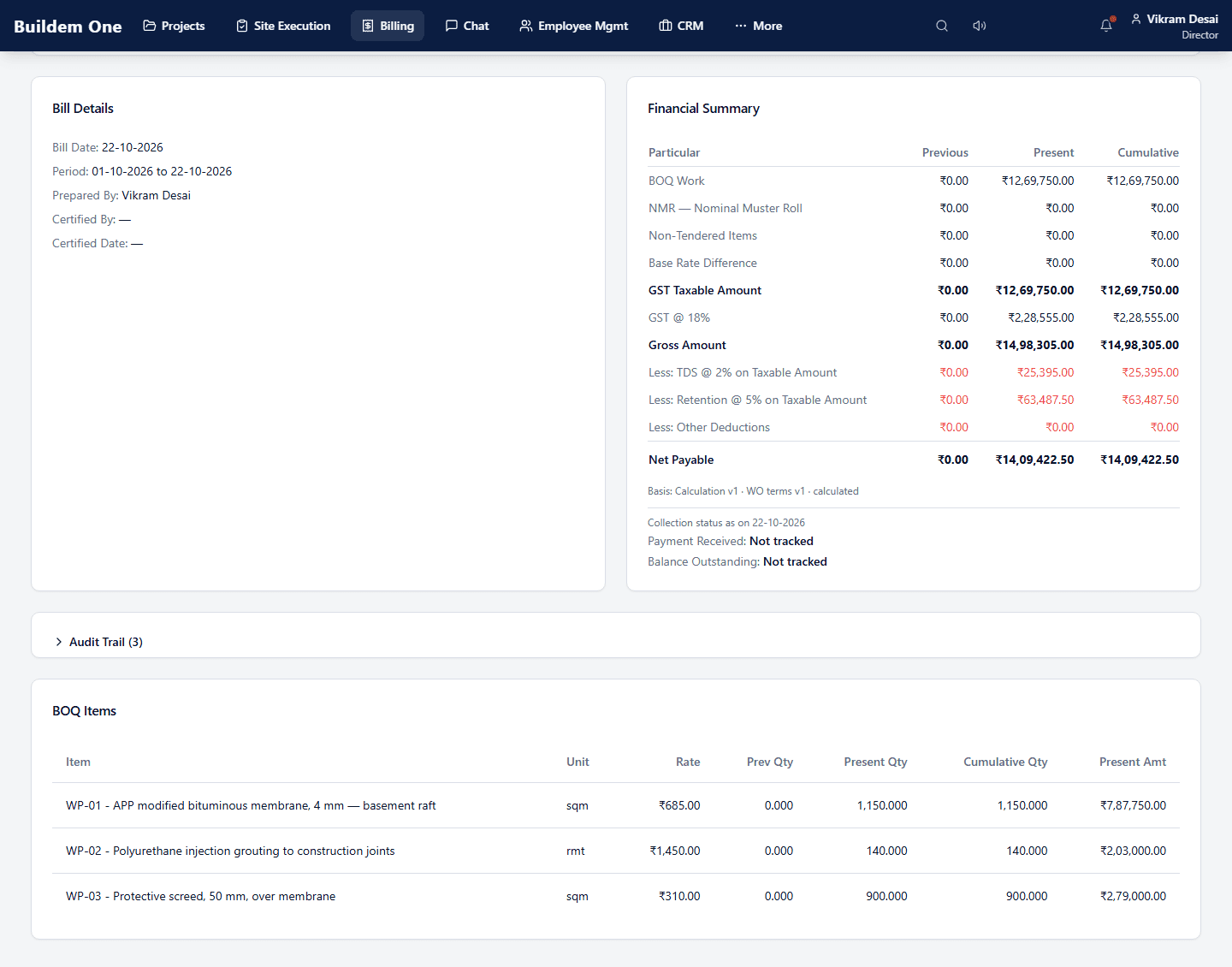
A running account bill works out GST, TDS and retention and shows the net payable, as previous, present and cumulative. RA bills are part of the Professional plan.
- Previous, present and cumulative amounts for every line
- GST on the taxable amount, then TDS and retention deducted
- Net payable at the foot of the summary
One chain, one project record
Each step shows the plan that includes it.
- 01Starter+
Lead & client
Enquiries, clients and contacts
- 02Starter+
Project
Sites, teams, zones and scope
- 03Professional+
Work order & BOQ
Contract scope with measured items
- 04Professional+
Measurement
Measurement and abstract sheets
- 05Starter+
Labour & attendance
Daily muster, overtime approval, wages
- 06Starter+
Material & purchase
Requests, purchase orders, supplier invoices
- 07Starter+
Daily progress
Site reporting against activities
- 08Professional+
RA bill
Revisions with cumulative authority
- 09Starter+
Collections
Receivables ageing and TDS visibility
How you start
Choose a plan
Starter, Business or Professional, with the price and the limits side by side.
Create your company account
Online, with your email. The total including GST is shown before you pay.
Set up with us
Standard account setup and one remote onboarding session are included.
Questions
How do I get started?
Create your company account online. For help with setup or renewal, contact support@buildem.in. Standard setup and one remote onboarding session are included in every plan.
Can I buy from outside India?
Prices are in Indian rupees (INR) and are the same for every customer, wherever you are. Online sign-up and payment currently serve businesses billing from India. If your business is outside India, you can still ask for a demo or write to sales@buildem.in. We reply in writing with what is available for your country before you commit to anything. We do not yet offer online checkout in other currencies.
Which plan includes work orders, BOQ, measurement and RA bills?
The Professional plan. Starter and Business have the same features as each other and differ only in capacity; Professional adds work orders, BOQ, measurement, RA bills, and subcontractor and labour-contractor commercial management.
What happens when I reach a limit?
You cannot add more until you free capacity or move to a larger plan. Nobody is signed out and no record is hidden. Completed projects and deactivated records do not count towards your limits.
Is there a labour attendance app for construction sites?
Attendance is part of every plan. A supervisor marks the daily muster from site on a phone; the day is then approved and locked, overtime is approved against hours worked, and payroll is computed from attendance that was already approved.
Can I see what each site costs?
Material consumption and labour are recorded against the project, and site zones let progress and cost land per area. On the Professional plan, labour is also costed to the work order it was spent on.
Does Buildem One replace my accounting software?
No. Buildem One does not offer statutory accounting. It gives you receivables ageing, vendor payables, subcontractor exposure and TDS visibility, and structured exports for your accountant.
Can I stop renewing?
Yes, at any time. Subscriptions do not renew or debit automatically, and you keep access to the end of the period you paid for. The first subscription has a seven-day full refund.
Where is my data held?
Our production database and uploaded files are hosted in Mumbai, India. A frozen copy of the former Tokyo database and files is kept as a recovery copy. It is not used to run the service and is retained for a planned 14-day recovery period. Its deletion is subject to a final recovery review and authorisation. No AI service receives your records. We use no advertising tools, and the service itself uses no analytics tools; this website runs analytics only if you accept it.
Is it priced per user or per record?
Each plan has limits for users, active projects, and active employee, labour and subcontractor records. Users are the people who sign in; a worker on the muster is a record you keep, not a user.
See it against your own jobs
Choose a plan and create your company account online. If you would rather see it on your own trade first, request a demo.
Optional: for help choosing a plan, a custom arrangement or migration, write to sales@buildem.in. We reply in writing before suggesting a call.